Iron Messenger
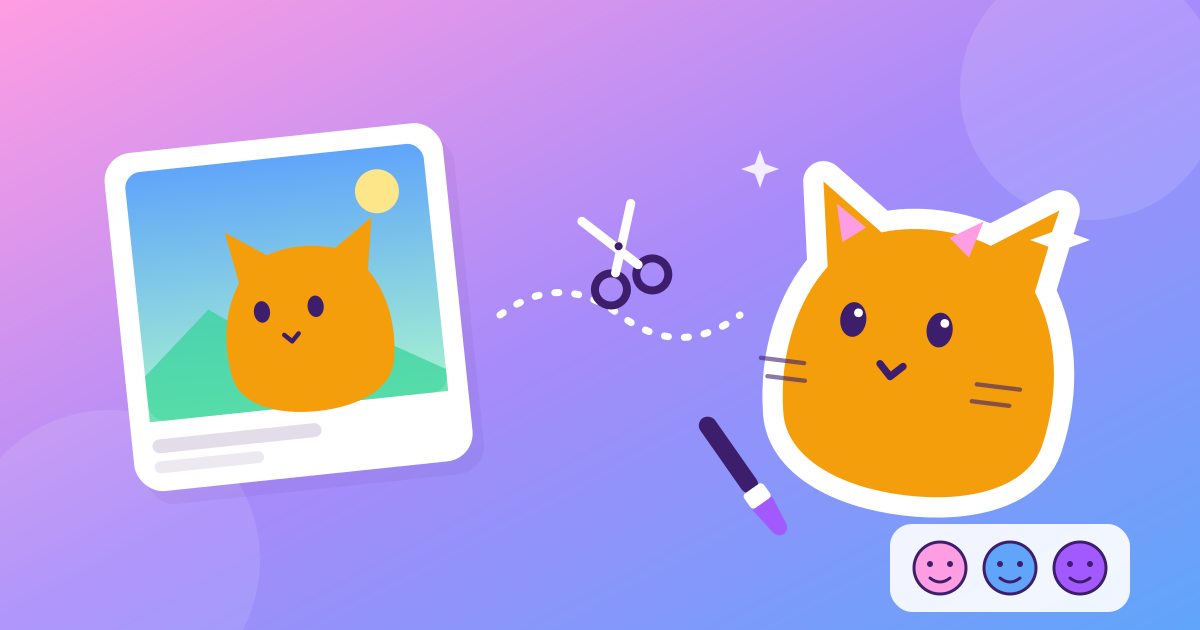
You can make stickers from your own photos inside Iron Messenger with Iron Lab, a built-in sticker editor. Pick a photo, let the phone cut out the subject (on the device, no cloud upload for the cut-out), touch it up with a brush, add an outline and save it into your own pack. Making stickers is free, and you get 10 packs of your own on the free tier.
What is Iron Lab?
Iron Lab is the sticker maker built into Iron Messenger. It is laid out like a small photo editor rather than a form: the board with your picture in the middle, a hint line that tells you what the current tool does, and a dock of four tools along the bottom. Save stays pinned to the bottom of the screen, so you never scroll to find it.
Every sticker you make goes into a sticker pack you own, not into your phone's gallery. That is the point: a pack is something you can send, share and keep using for years. Your friend's face mid-sneeze, your cat judging you, the boss's coffee mug. If it is in a photo, it can be a sticker by the end of the bus ride.
How do you make a sticker from a photo?
- Open Iron Lab and pick a photo.
- Cut. The phone finds the subject and removes the background for you. People, pets and objects with clear edges work best.
- Erase and Restore. Fix what the cut-out got wrong with a brush: erase a stray bit of background, bring back an ear that went missing. Undo takes back one stroke at a time.
- Place it. Move, turn and resize the cut-out with two fingers until it sits right.
- Outline. Add the white sticker border that makes it pop on any chat background.
- Pick an emoji for it (you can skip this) and save it into a pack.
That is the whole flow. A finished sticker is small, a few dozen kilobytes, so it sends in a blink even on a weak connection. If your internet is often bad, our guide to messaging on old phones and slow networks has more on how the app keeps things light.
Your camera roll is a sticker pack waiting to happen. Iron Lab is free, and so are your first 10 packs.
Does the photo leave your phone?
Not for the cut-out. Background removal runs on the phone itself with an on-device model, so the original photo is not uploaded anywhere to be processed.
The finished sticker, of course, does go to our server when you save it into a pack, because that is how your friends receive it. Only the cut-out sticker travels, not the full photo you started from. Stickers never expire: a pack is made to be reused, so it stays until you delete it.
How do sticker packs work?
- You own your packs. Each pack holds up to 120 stickers. You can make 10 packs on the free tier, 20 with Premium, 30 with Premium Plus and 50 with Premium Ultra.
- Sharing is one tap. When someone gets a sticker from you, they can open the whole pack and add it to their own list. Adding a pack never changes who owns it: you stay the author.
- Adding is unlimited. The pack limit counts only packs you made. Collect as many of other people's packs as you like, on any tier.
- Popular packs. In Settings → Stickers & GIFs you can browse the packs people add most, so good packs spread without anyone having to send them first.
- GIFs are free too. Search and send GIFs at every tier, because a GIF is how half of all replies get written.
Stickers are a big part of what makes a group chat feel like yours. A pack of inside jokes is the fastest way to turn a new chat into a running gag.
Can a sticker make a sound?
Yes, and it is free. When you save a sticker, you can tag it with an emoji, and some emoji come with a sound. Tag a sticker with a laughing emoji and it laughs, tag it with food and it chews, tag it with 💩 and it plops. It plays for you when you send it and for the people who receive it.
There is deliberately no sound for an ordinary incoming message. A noise nobody asked for is a bug. A sticker is the joke, so the joke gets the sound.
Make one sticker tonight. By tomorrow your group chat will have stolen the whole pack.
What is free and what is Premium?
| Feature | Free | Premium tiers |
|---|---|---|
| Making stickers in Iron Lab | Yes | Yes |
| Packs of your own | 10 | 20 / 30 / 50 |
| Stickers per pack | 120 | 120 |
| Adding other people's packs | Unlimited | Unlimited |
| Sticker sounds, GIFs, popular packs | Yes | Yes |
| Stickers inside a line of text | No | From Premium |
| A sticker as your status | No | From Premium |
The rule behind it: making stickers spreads the app, so it is never behind a paywall. What Premium buys is room for more of your own packs, which take permanent storage, plus a couple of ways to show stickers off. Prices are set by each store and shown in the app in your currency. More on the whole free-versus-paid split is in our overview of Iron Messenger.
Questions people ask
How do I make a sticker from a photo in Iron Messenger?
Open Iron Lab in Iron Messenger, pick a photo and tap Cut to remove the background. Fix the edges with Erase and Restore, add an Outline, then save the sticker into one of your packs.
Is the photo uploaded to remove the background?
No. The Iron Messenger cut-out runs on your phone with an on-device model. Only the finished sticker is uploaded when you save it into a pack, so friends can receive it.
How many sticker packs can I make for free?
Ten packs of your own in Iron Messenger, with up to 120 stickers each. Premium, Premium Plus and Premium Ultra raise the limit to 20, 30 and 50 packs. Adding other people's packs is unlimited.
Can my friends use my stickers?
Yes. Anyone who receives one of your Iron Messenger stickers can open the whole pack and add it to their list. You stay the owner of the pack.